
It's Monday morning. You're on Ubuntu, your team is on Microsoft 365, and somebody just emailed you a SharePoint link to a 400 MB Word doc you need to read in the next ten minutes. You open it. The browser tries to render it. The viewer is slow. You can't search inside it. You can't open it in LibreOffice without downloading a local copy first. You stare at the file, then at your terminal, and ask the question every Linux user with a Microsoft-shop team has asked: why isn't OneDrive on Linux just a folder yet?
This post is the answer. There is no first-party OneDrive for Linux client. Microsoft hasn't shipped one in 15 years and probably won't, because Linux desktop usage is still a rounding error to them. But Linux OneDrive access is a solved problem now — there are four real options that work, and the right one depends on what you're trying to do. We make one of them, so call this opinionated — but we'll be honest about where each option fits and where it falls down.
The four working options
Every working OneDrive-on-Linux setup falls into one of four buckets:
| OneDrive Linux client | What it is | Cost | Sync or mount |
|---|---|---|---|
| rclone | Swiss-army-knife CLI for cloud storage | Free (MIT) | Both, via rclone mount |
abraunegg's onedrive | Dedicated OneDrive sync daemon | Free (GPLv3) | Sync only |
| OneDriver | FUSE filesystem for OneDrive | Free (GPLv3) | Mount only |
| ExpanDrive | Polished cross-OS mount client with a GUI | Free (≤10 users) | Mount only |
These are the only options worth your time. Everything else is either abandoned (the old onedrive-d project, the various Dropbox-look-alike WordPress plugins) or doesn't actually work on OneDrive (Insync used to, dropped support in 2024).
Sync vs mount: the only architectural decision that matters
Before picking a tool, pick a model. They behave very differently.
A Linux OneDrive sync client keeps a local copy of every file you've selected, watches for changes on both sides, and pushes deltas. It's what the Windows OneDrive client used to do before Files On-Demand. Your local disk holds the data; the cloud holds a copy. The good: files work offline (plane mode, coffee shop, no internet — your files are still there), and reads are fast because the file is on your SSD. The bad: disk usage equals the size of the synced subset, so a 500 GB OneDrive needs 500 GB locally unless you carefully select which folders sync; conflict resolution between fast local edits and slow cloud writes occasionally produces _(conflicted) filenames; and the initial sync on a big library can take hours.
A Linux OneDrive mount client doesn't pre-download anything. The cloud storage shows up as a drive; files appear in your file manager; opening a file pulls it from the cloud on demand and caches recent reads. The good: zero disk usage at rest, instant access to any file in the library (no "is this folder synced?" mental overhead), and native filesystem semantics so terminal apps, grep, find, and IDEs all see the mount like a normal directory. The bad: reads require network, offline use means caching specific files in advance, and a large-file open is bottlenecked by your downlink rather than your SSD.
If you have less data than disk, sync is fine. If you have more data than disk, or you're on a laptop that travels between offices and wants the same OneDrive view everywhere without managing disk space, mount is the only sane answer.
When each tool is the right answer
rclone — for the sysadmin who already uses it for everything else
If you already use rclone for S3, GCS, and remote backups, adding onedrive as another backend is fifteen minutes of config. rclone mount gives you a usable read/write filesystem.
- Pros: free, scriptable, fits into existing rclone workflows, supports both OneDrive Personal and OneDrive for Business
- Cons: setup is YAML and command-line, the mount lacks some niceties of a desktop client (no GUI, no Finder/Files integration beyond raw FUSE), and you'll be tuning
--vfs-cache-modeand--buffer-sizefor a while before the throughput is where you want it
Pick rclone if you live in a terminal anyway and the OneDrive mount is one of many cloud mounts you maintain.
abraunegg's onedrive — for OSS purists who want sync, not mount
The abraunegg/onedrive project is the gold-standard OSS OneDrive sync daemon for Linux. It's the actively-maintained fork of the original skilion/onedrive and is what nearly every OneDrive-on-Linux thread on Stack Exchange recommends. It works on Personal, Business, and SharePoint document libraries.
- Pros: high-quality OSS, GPLv3, supports SharePoint sites and Business accounts, mature config (selective sync, monitor mode, webhooks)
- Cons: it is a sync client. You'll be syncing data locally. Config is text files in
~/.config/onedrive/, which is fine if that's your taste and a chore if it isn't.
Pick this if you want a real OSS solution, you have the disk space for your full OneDrive, and you don't mind reading the project's extensive docs to get the right sync filters in place.
OneDriver — the FUSE-based mount option
The OneDriver project is a single-purpose FUSE filesystem for OneDrive. Mount your account, get a folder, open files like you'd open any file. It's the FOSS answer to "I want mount semantics, I don't want to pay."
- Pros: mount-style, GPL, lightweight, integrates as a
Files-style mount on GNOME with no extra config, available in the AUR / on Fedora's Copr - Cons: SharePoint support is limited (works for personal OneDrive and Business, less reliable on shared SharePoint document libraries), and the project is the work of one maintainer — feature velocity is what you'd expect from a side project. Some advanced behaviors (cross-tenant access, granular access controls) aren't there.
Pick OneDriver if you want mount semantics, your use case is mostly personal OneDrive or single-tenant Business OneDrive, and "single-maintainer GPL project" is a feature for you, not a risk.
ExpanDrive — the polished cross-OS mount option
We make this one. Here's the honest pitch.
ExpanDrive is a cloud-mount client that runs on Linux (Ubuntu, Linux Mint, Fedora, RHEL, CentOS, Debian, Arch, OpenSUSE), macOS, and Windows. It mounts OneDrive, OneDrive for Business, SharePoint sites, and 30+ other cloud providers as native drives. As a OneDrive Linux client it covers Personal and Business; as a SharePoint Linux client it handles site collections and shared document libraries that the OSS options struggle with. Same UI, same mount behavior, same keyboard shortcuts across all three OSes.
Free for individuals and teams under 10 users. ExpanDrive was acquired by Files.com in 2025 and moved to a freemium model — solo developers, designers, sysadmins, and small teams pay nothing. Paid licenses are required for larger commercial, academic, and government teams, and unlock the Web Management Console, headless Server Edition, and full technical support. If you're reading this post to solve OneDrive on your own Linux machine, you're in the free tier.
What you get over the OSS options:
- A real desktop GUI for adding accounts, switching connections, and inspecting mount health. No
~/.config/editing. - Full SharePoint on Linux support. Site collections, shared document libraries, sites in other tenants — all mountable. This is the one place we materially outdo the OSS options, because the Microsoft Graph endpoints for SharePoint are quirky and we've spent years on the edge cases.
- Cross-platform consistency. A team where some people use Ubuntu, some Mac, some Windows, gets the same client, the same shortcuts, and the same Files.com-style web mounting story. The OSS options force you to use a different client per OS.
- Microsoft Graph API direct, so authentication uses your normal Microsoft 365 login — no screen-scraping or browser cookie hacks.
Where ExpanDrive doesn't fit:
- It's mount-only. No offline mode. If you fly a lot and need the files on the plane, sync is the right shape — use abraunegg's client.
- It's closed-source. If license freedom matters to you, OneDriver or abraunegg's client is the right call.
- Large teams pay. If you're past 10 seats in a commercial / academic / government org, you need a paid license. Pricing on the download page; the free tier covers most readers of this post.
We're not trying to convince every Linux user to use ExpanDrive. We're trying to be useful to the admin who's already evaluated the OSS options, hit their limits, and is now reading this page to figure out whether the polished cross-OS option is worth a download. If that's you, the rest of this post is the install path and the screenshots.
What ExpanDrive on Linux looks like
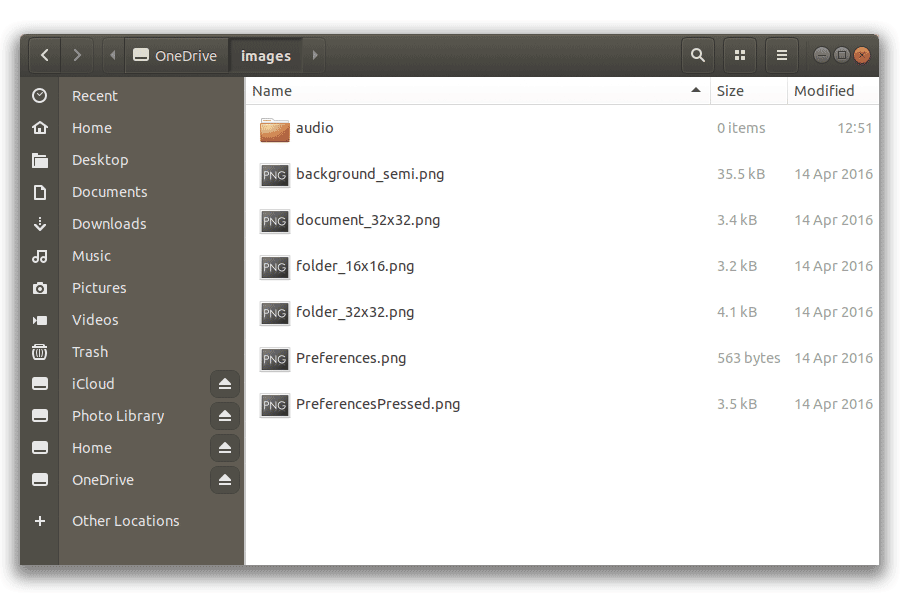
OneDrive mounted directly in the file manager:
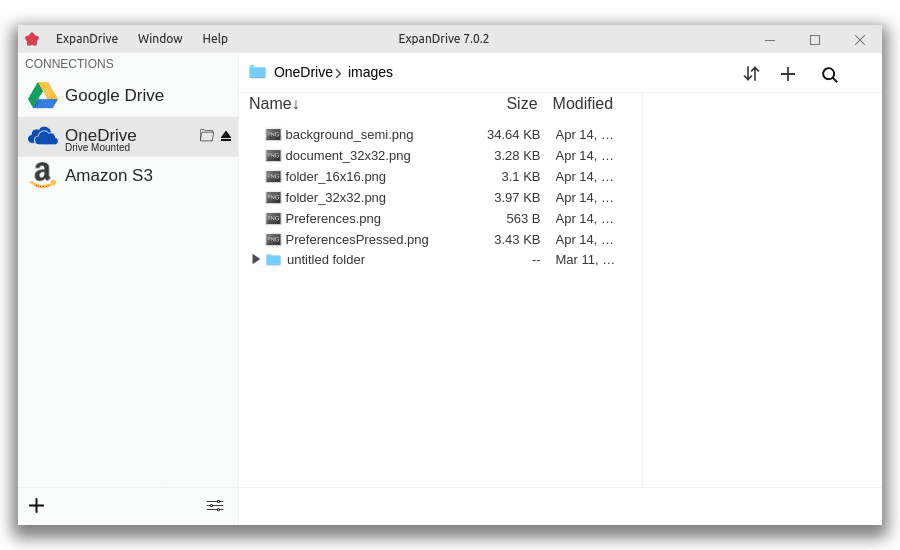
The cloud storage browser for advanced operations — granular permissions, file metadata, bulk uploads:
Supported distros (anything with a recent glibc and a working FUSE 2.9+ should work; these are what we test):
- Ubuntu
- Linux Mint
- Fedora
- CentOS / RHEL
- Debian
- Arch Linux
- OpenSUSE
Installing ExpanDrive on Linux
For Debian/Ubuntu, download the latest .deb from expandrive.com/download and install it. The graphical installer works, or:
sudo apt install ./ExpanDrive_<latest>_amd64.deb
The installer adds our apt repository and signing key so apt upgrade keeps you current.
For Fedora/RHEL/CentOS, the .rpm from the same download page is the equivalent:
sudo yum localinstall ./ExpanDrive-<latest>.x86_64.rpm
Manual repo setup (Debian/Ubuntu):
curl https://packages.expandrive.com/keys/expandrive.asc | gpg --dearmor > packages.expandrive.gpg
sudo install -o root -g root -m 644 packages.expandrive.gpg /usr/share/keyrings/
echo "deb [arch=amd64 signed-by=/usr/share/keyrings/packages.expandrive.gpg] https://packages.expandrive.com/expandrive stable main" | \
  sudo tee /etc/apt/sources.list.d/expandrive.list
sudo apt-get update && sudo apt-get install expandrive
For headless server deployments, see ExpanDrive Server Edition. It runs at boot rather than user login, supports re-sharing mounts over SMB, and is what you want for a CI runner or a backup server that needs OneDrive as a stable mount point.
Full install docs and troubleshooting for each distro live in our Linux documentation.
The honest take
OneDrive on Linux is solved enough now that you don't have to feel like a second-class citizen. If you're a sysadmin already running rclone, add OneDrive as another rclone backend. If you want a real OSS sync daemon with strong SharePoint support, use abraunegg's client. If you want mount semantics out of an OSS project, use OneDriver. If you want a polished cross-OS mount with full SharePoint coverage and a GUI, download ExpanDrive — free for individuals and teams under 10 users, no trial cliff, no credit card.
The era of "OneDrive doesn't work on Linux" is over. The era of "pick the right OneDrive Linux client for your shape" has been here for a while.