
You have a 4 TB S3 bucket and a 1 TB laptop. Half the files are CloudFront origin assets nobody touches; half are video masters you want to grep through and occasionally open in Premiere. The AWS web console takes seven clicks to navigate three folders deep. The AWS CLI is great for s3 sync but useless when you want to open a .psd from Finder. You're staring at your terminal and wondering: why isn't this S3 bucket just a drive letter?
It can be. This post covers mounting Amazon S3 as a drive on Mac, Windows, and Linux — turning the bucket into a literal S3 drive in your file manager. What the architectural choices are, who makes the tools that actually work, and where the limits hit. We make one of those tools, so call this opinionated — but the framing is real even if you end up using something else.
What "mount S3 as a drive" actually means
Mounting Amazon S3 as a network drive makes the bucket appear as a drive in your file manager — S: (or whatever letter you pick) on Windows, a mounted volume in Finder on Mac, a folder in your Linux file manager. Open a file from the mount; your default app opens it. The object downloads in the background on demand, gets cached, and uploads back to S3 when you save. Files-On-Demand semantics over the S3 API: zero local disk at rest, bucket-as-filesystem semantics for every app on your machine. That's all "mount S3 as drive" really is — a thin filesystem layer in front of the S3 REST endpoints.
This is a different shape than the official S3 tools:
- The AWS web console is fine for one-off file inspections and IAM policy editing. Painful for everything else — no native app integration, no
grep, no Photoshop opening a file from the bucket. - The AWS CLI is fine for scripted operations (
aws s3 sync,aws s3 cp,aws s3 ls) but is the wrong shape when you want to use S3 as a working filesystem. It's a transfer tool, not a mount. s3fs-fuseandgoofysare the OSS FUSE filesystems for S3 — Linux-only, decent for headless server use, less great as a daily-driver mount on a workstation.- Mounting via a desktop S3 client (ExpanDrive, Mountain Duck, etc.) — the Files-On-Demand shape on every desktop OS, with a GUI to manage connections and bucket-level mount granularity.
The S3 mount landscape
The market for "mount S3 as drive" tools is more crowded than the Microsoft cloud space. The real options:
s3fs-fuse— the classic Linux S3 FUSE filesystem. Free, works, has known performance limits for high-concurrency workloads. The thing many people Google "s3fs windows" looking for and don't find: there isn't a Windows port; FUSE is a Linux/macOS concept. On Linux it's a reasonable choice for a server mount.goofys— a faster Linux S3 FUSE that trades some POSIX compliance for throughput. Better thans3fs-fusefor read-heavy workloads. Same Linux-only constraint.rclone mount— the swiss-army-knife approach. If you already use rclone for everything, addings3as a backend is fifteen minutes. Cross-platform viacmounton Mac/Windows.- Mountain Duck — paid commercial S3 mount client built on top of Cyberduck. Mac and Windows only; no Linux. One-time license + paid major-version upgrades.
- ExpanDrive — what we make. Cross-platform (Mac, Windows, Linux), freemium since the 2025 Files.com acquisition.
If you're running a Linux server and need an S3 mount that survives boot, s3fs-fuse or goofys is the right call. If you're on a desktop and want a polished GUI with cross-OS consistency, that's what this post is about.
What ExpanDrive does for S3
ExpanDrive is an Amazon S3 drive client for Mac, Windows, and Linux — turn your bucket into a network drive on every desktop OS. Free for individuals and teams under 10 users since the 2025 Files.com acquisition — paid licenses only required for larger commercial, academic, and government teams.
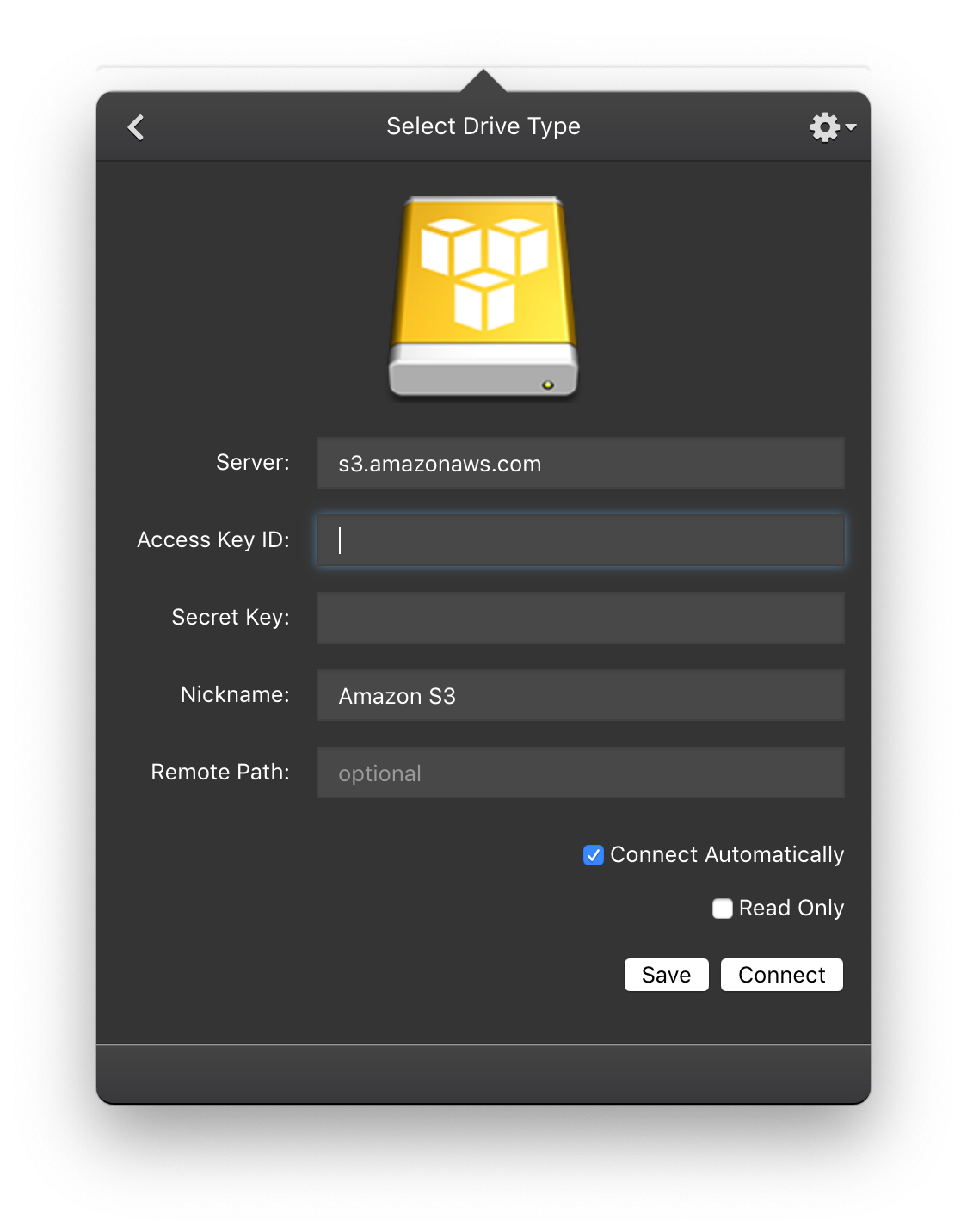
What you get:
- Mount S3 on Mac. Finder integration; double-click any object in the bucket and it opens in the default app. Works under Intel and Apple Silicon, mount survives sleep/wake. The Amazon S3 client for Mac experience without leaving Finder — useful when you've spent the morning Googling "mount s3 mac" and "mount s3 bucket mac" and only finding
brew install s3fsanswers that don't quite fit. - Mount S3 on Windows. Drive letter assigned in Explorer; Photoshop, Premiere, Excel, every app sees S3 like a local drive. The Windows S3 client people search for when they type "s3 client windows" or "s3fs windows" — without the OSS-on-Linux-but-not-Windows problem.
- Map S3 as network drive on Linux. Ubuntu, Linux Mint, Fedora, RHEL, CentOS, Debian, Arch, OpenSUSE all supported. Same client and config as Mac/Windows. The polished-GUI option that the
s3fs-fuse/goofysroute doesn't quite cover. - All AWS regions. Every public AWS region; standard transfer, accelerated transfer, or VPC endpoint depending on how you've configured the connection.
- Bucket-level or folder-level mount. Mount the root of your Amazon S3 drive (see all buckets), or pin to a specific bucket as the mount root, or map S3 bucket to Windows drive letter (or Mac mount point) at a folder prefix. Useful for permission-scoped IAM roles that only see one bucket, and the answer to the long-tail "map s3 bucket to windows drive" Google query.
- IAM credentials + STS AssumeRole. Authenticate with IAM access keys, instance-profile credentials, or assumed-role temporary credentials. SSO via AWS SSO / IAM Identity Center works through the same flow your
aws-cliuses. - S3-compatible providers too. The same mount works against any S3-compatible API endpoint — Backblaze B2, Wasabi, Cloudflare R2, MinIO, DigitalOcean Spaces, Linode Object Storage, etc. Useful if you're using a non-AWS provider for cost reasons (R2 in particular has no egress fees) and want the same mount UX as your AWS workflows.
How to map Amazon S3 as a network drive
The setup path, same on every supported OS:
- Get IAM credentials. AWS recommends IAM keys, not root keys. The AWS docs cover creating an access key for an IAM user. Permissions: at minimum
s3:ListBucketon the bucket you want to mount, pluss3:GetObjectfor reads ands3:PutObjectfor writes. - Download ExpanDrive for Mac, Windows, or Linux. Install.
- Open ExpanDrive, click Add Connection, pick Amazon S3.
- Paste your Access Key ID and Secret Access Key. Optionally pin to a specific bucket via the Remote Path field (e.g.
my-bucket-name) — leave blank to mount the account root and see all your buckets. - Click Connect. The bucket shows up in Finder / Explorer / your Linux file manager.
About 90 seconds end-to-end once you have the IAM credentials. The mount auto-reconnects on boot or after sleep, so this is set-and-forget — you'll see S3 in your file manager every time you log in.
For S3-compatible providers (Wasabi, R2, Backblaze, MinIO), the same flow works — just pick the matching connection type from ExpanDrive's provider list, or paste a custom S3-compatible endpoint into the connection config.
Files-On-Demand semantics
When you double-click a file from the mounted S3 bucket, ExpanDrive transparently downloads it in the background and caches it locally. The cache evicts least-recently-used objects as it fills, so disk usage stays bounded regardless of bucket size. Read-heavy workflows benefit from the cache; write-heavy workflows get background uploads that don't block your save dialog.
For bulk operations — migrating data into S3, downloading a 200 GB folder for offline reference, uploading a directory tree — ExpanDrive's built-in storage browser does the work without going through Finder/Explorer. It's the same pattern many devs use for aws s3 sync: a programmatic transfer when you need bulk operations, a mounted drive for everyday access. (If you're specifically looking for the GUI-browser side of this story — bulk operations against S3 without the mount — see our S3 browser for Mac post.)
The mount handles multi-megabyte concurrent transfers with multi-threading. Streaming a video file from a mounted S3 bucket through Premiere or VLC works the same way streaming from a local SSD does, modulo your downlink.
When ExpanDrive isn't the right answer
Three real tradeoffs:
- No offline mode. If you fly a lot and need S3 objects on the plane, mount semantics are the wrong shape. Pre-download what you need into a local folder, or use
aws s3 syncto pull a subset. - Bandwidth-bound for large reads. Opening a 20 GB video master over hotel Wi-Fi is gated by your downlink. Run the mount over a fast connection or pre-cache the file.
- You're past 10 users in a commercial / academic / government org — a paid ExpanDrive license is required. Pricing on the download page. The free tier covers individuals and small teams.
Where mount wins is everywhere else: large buckets you can't fit on a laptop, daily-driver S3 workflows where opening files in native apps matters, mixed-OS teams who want one S3 client across Mac and Linux, anyone who's tired of the AWS web console for routine work, and shops using S3-compatible providers like Wasabi or R2 who want the same UX as their AWS workflows.
System requirements
ExpanDrive runs on currently-supported versions of:
- macOS — Intel and Apple Silicon
- Windows 10 / 11, Windows Server 2016+, Terminal Services / RDP environments
- Linux — Ubuntu, Linux Mint, Fedora, RHEL, CentOS, Debian, Arch, OpenSUSE (any distro with a working FUSE 2.9+ should work; these are the ones we test)
Per-user mount isolation on multi-user Windows machines — each logged-in user sees their own S3 connections, even on shared RDP / Terminal Services hosts.
Full install docs and per-OS specifics: docs.expandrive.com. The dedicated Amazon S3 integration docs cover the connection-level config — region selection, signature version, virtual-hosted vs path-style requests, server-side encryption headers.
Try it
Download ExpanDrive. Free for individuals and teams under 10 users. No trial cliff, no credit card.
Mount your first S3 bucket as a network drive in about 90 seconds, on whichever OS you're running. If you've been wrestling the AWS web console for routine file work, or you're on Windows wondering why s3fs doesn't have a Windows version, or you're on Linux looking for a polished mount client to sit alongside your aws-cli setup, this is the answer. The Files-On-Demand shape over S3 is the same shape that makes the AWS-native experience work — ExpanDrive just brings it to every desktop OS and to S3-compatible providers like Wasabi, Backblaze B2, and Cloudflare R2.