
Microsoft doesn't ship a SharePoint client for Linux. They never have, and there's no sign they ever will — Linux desktop usage is a rounding error to them. So if you're on Ubuntu, Fedora, Debian, RHEL, or any other distro and your team's documents live in SharePoint, the official Microsoft answer is "use the web UI" and the unofficial answer is "good luck."
This post is the real answer. ExpanDrive is a SharePoint client for Linux that mounts your SharePoint tenant — sites, subsites, document libraries — as a native drive on every popular Linux distribution. Free for individuals and teams under 10 users since the 2025 Files.com acquisition; paid licenses required only for larger commercial, academic, and government teams.
What ExpanDrive does as a SharePoint Linux client
ExpanDrive runs on Ubuntu, Linux Mint, Fedora, RHEL, CentOS, Debian, Arch, OpenSUSE, and most other distributions with a working FUSE 2.9+. Whether you call it Linux SharePoint, SharePoint Ubuntu, or just SharePoint for Linux, the install path is the same: one client, every supported distro. Once installed and connected to your Microsoft 365 account, your SharePoint tenant shows up as a regular folder in your Linux file manager. Open a file with xdg-open, double-click from Files or Nautilus, grep across the contents from the command line — every Linux app sees SharePoint like a normal directory.
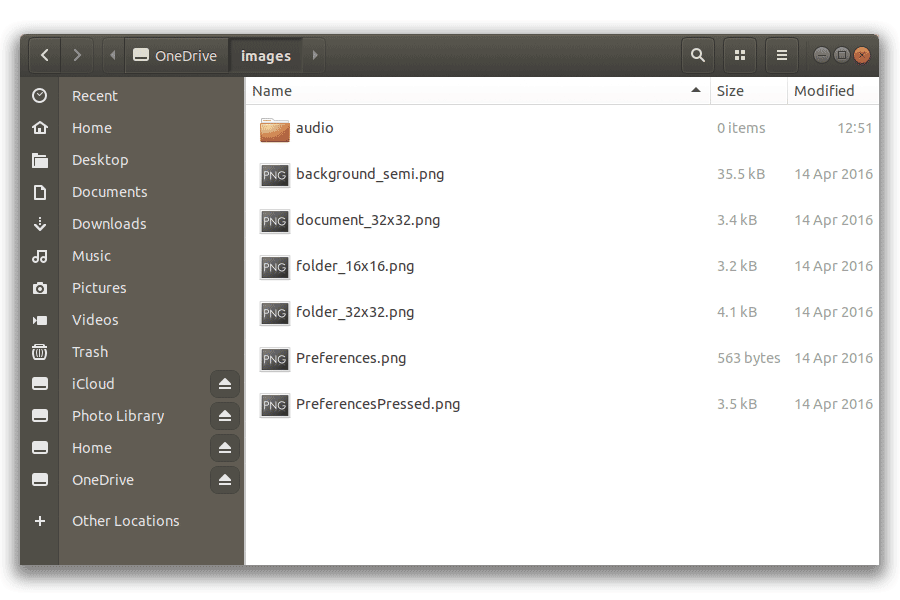
SharePoint mounted as a Linux network drive
The technical details:
- Microsoft Graph API direct — official Microsoft endpoint. Authentication goes through Microsoft's normal OAuth flow, so your SSO setup just works. Okta, Duo, Auth0, Microsoft Conditional Access, security keys — all the auth flows your organization already enforces apply per-account on Linux exactly as they do on Mac or Windows.
- Mount any site, subsite, or document library. Mount the root of your tenant, or pin to a specific Shared Drive or document library. Same connection-level config across platforms.
- Cross-platform parity. The same ExpanDrive runs on Linux, Mac, and Windows. A mixed-OS team (Linux developers, Mac designers, Windows business users) all get the same client and the same SharePoint mount behavior. No "Linux is a second-class citizen" maintenance burden.
- Files-On-Demand semantics. Zero local disk at rest. Files stream in when opened, cache locally with LRU eviction, upload back transparently on save.
- Command-line access. SharePoint files are reachable from the terminal the same way local files are.
find,grep,cat,rsync— all work against the mount.
Linux-specific advantages over sync
Microsoft's SharePoint integration on every platform — to the extent it exists at all — is sync-based. The Windows OneDrive client and the Mac OneDrive client pull SharePoint document libraries into a local folder. On Linux, the option doesn't exist at all from Microsoft.
A network drive mount has two advantages over sync, especially relevant on Linux:
- Zero pre-download. A 500 GB SharePoint library uses ~0 GB of your local SSD with ExpanDrive. The same library with a hypothetical Linux sync client (which doesn't exist anyway) would need either 500 GB of local disk or careful per-folder cherry-picking.
- No conflict-resolution drama. Sync clients chronicle conflicts in
_(conflicted)files; a mount has no such concept because reads and writes pass through to the SharePoint API directly. The last-writer-wins logic is the same as the SharePoint web UI's.
Install on Linux
The install path is short on every supported distribution.
Debian / Ubuntu — download the latest .deb package from expandrive.com/download and install:
sudo apt install ./ExpanDrive_<latest>_amd64.deb
The installer also registers our apt repository and signing key so future updates flow through apt upgrade.
Fedora / RHEL / CentOS — download the latest .rpm:
sudo yum localinstall ./ExpanDrive-<latest>.x86_64.rpm
Same auto-config of the yum repo for ongoing updates.
For manual repo setup, the full per-distro install docs are at docs.expandrive.com/installation-and-system-requirements/linux — keeping the up-to-date apt and yum repo URLs out of this post so they don't go stale.
After install, open ExpanDrive, click Add Connection, pick SharePoint, complete Microsoft's OAuth flow, and your SharePoint tenant mounts at ~/Cloud Drives/<connection-name> (or wherever you configure).
Server Edition for Linux
The ExpanDrive Server Edition runs unattended at boot on Linux servers — not at user login. Useful for CI runners that need SharePoint mounted as a stable filesystem, backup servers that re-share a SharePoint document library over Samba, or any headless workflow where SharePoint needs to be a drive that survives reboots without any user logged in. Server Edition is part of the paid tier (organizations over 10 users); the desktop client is free for the free-tier audience.
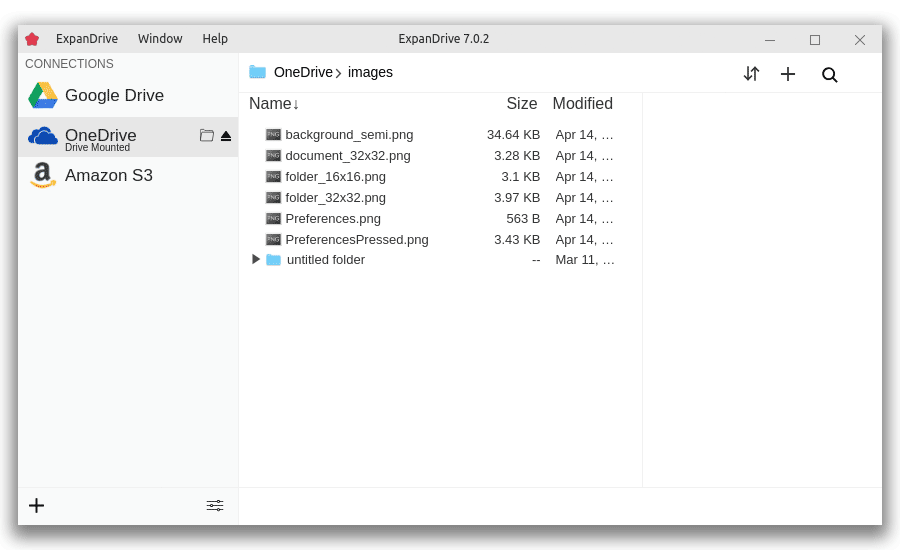
Server-side SharePoint mount on a Linux server
When the OSS Linux options fit better
Real talk: ExpanDrive isn't the only way to access SharePoint document libraries from a Linux machine. The other options are mostly OneDrive-focused but can reach SharePoint document libraries through the same Microsoft Graph endpoints:
- abraunegg's
onedrive— Linux sync daemon, supports SharePoint sites with the right config. Use if you want OSS, sync semantics, and you're comfortable with~/.config/onedrive/text files. - rclone with the OneDrive backend — works against SharePoint document libraries via the same Microsoft endpoints; gives you mount-as-drive via
rclone mount. Use if you already live in rclone for other backends.
Both are free OSS. The honest comparison with ExpanDrive:
- ExpanDrive has full SharePoint support including subsites, document libraries, and cross-tenant mounts — the OSS options can handle simple SharePoint cases but have known limits on shared-permission scopes and tenant-spanning configs.
- ExpanDrive has a desktop GUI; the OSS options are command-line config + maybe a third-party GUI wrapper.
- ExpanDrive is cross-platform consistent across Mac/Windows/Linux for mixed-OS teams; the OSS Linux options are Linux-only.
If you're a single Linux user with a simple SharePoint configuration and a strong OSS preference, abraunegg or rclone is a fine call. For everyone else — multi-tenant work, mixed-OS teams, the polished-desktop-client experience — ExpanDrive is what this post is about.
For the deeper "OneDrive and SharePoint on Linux" comparison covering rclone, abraunegg, OneDriver, and ExpanDrive side by side, see OneDrive and SharePoint on Linux. For the mount-setup specifics across all three OSes, see Mount SharePoint as a Drive on Mac, Windows, and Linux.
When ExpanDrive isn't the right answer
Three real tradeoffs:
- No offline mode. Mount semantics require network. If you fly a lot and need SharePoint files on the plane, the offline shape (sync) is the right call — but Microsoft doesn't ship a Linux sync client, so this constraint mostly pushes you onto a Mac or Windows for offline-heavy work.
- Bandwidth-bound for large reads. Opening a 2 GB file over slow Wi-Fi is gated by your downlink, not your SSD. Reasonable for everyday document work; painful for video editing on hotel internet.
- You're past 10 users in a commercial / academic / government org — a paid ExpanDrive license is required. Pricing on the download page. The free tier covers individuals and small teams.
Where ExpanDrive wins: Linux developers in Microsoft 365 shops, IT admins running headless Linux servers that need SharePoint mounted at boot, mixed-OS teams that want one client behaving identically across platforms.
System requirements
ExpanDrive on Linux runs on currently-supported versions of:
- Ubuntu, Ubuntu LTS
- Linux Mint
- Fedora
- CentOS / RHEL
- Debian
- Arch Linux
- OpenSUSE
Any distro with a working FUSE 2.9+ should work; the above are the ones we test. The desktop GUI uses GTK / X11 (or Wayland on supported distros).
Full per-distro install specifics: docs.expandrive.com/installation-and-system-requirements/linux.
Try it
Download ExpanDrive. Free for individuals and teams under 10 users — no trial cliff, no credit card. Install in about 60 seconds on any supported distro, connect a SharePoint account in another 90, and your SharePoint mount shows up in your Linux file manager the same minute.
The SharePoint client for Linux Microsoft never shipped. Free for most teams reading this post.